Pipo Max M3
Why

I saw an advert saying this particular tablet have stereo speakers. You know I can't resist testing speakers.. That and I wanted to have a tablet with RK3066 to play with.
Where
As per usual, I bought this off Aliexpress for USD202 including DHL shipping using some coupons :).

Specifications
Im too lazy to write the specs. Here's a picture I found online instead:

Build Quality
Overall, the build quality is actually quite good. Doesn't feel like a premium device but doesn't feel excessively cheap either. It reminds me of the Samsung Note 10.1. The back is all aluminium and hence feels good. Buttons all worked well and give satisfying feedback. One minor issue is if you press the some parts of the screen, it can creak a little bit which suggests that there are some empty spaces inside. Not really an issue really, just an observation.
When I received the tablet, I was not expecting that it would come in two boxes. One contains the tablet and a cloth.

The other box contains the accessories: charger, headphone and USB cable.


The tablet itself.

The back is empty except of the rear camera and the reset button for getting the tablet into flash mode.

Volume and home button.

The right side is full with ports. From left to right are the charging LED, charging socket, MicroSD card slot, mini HDMI, 3.5mm audio jack, slave and host USB ports, power button and lastly the microphone hole.

One of the two front facing speakers.

Screen
10.1" IPS screen. *Insert all good comments about IPS here*. The brightness can get pretty high. One thing I noticed about Chinese tablets with IPS screens is that they are too bright even at lowest setting. If somehow the brightness could be reduced even further, I am sure it would help improve the battery life tremendously.


Camera and Microphone
There's two cameras in the tablet, the front is 2.0MP and back is 5.0MP. Unsurprisingly both are terrible :). They work okay under perfect lighting but other than that you are better served using a cheap compact cameras. Since neither have autofocus, you are pretty much guaranteed a blurred picture everytime you use any of the two. The night mode works well and make the camera a tiny bit more usable under usual lighting.

Front camera auto mode.

Front camera night mode.

Rear camera auto mode.

Rear camera night mode.
The mic also works well in games such as Talking Tom and other "talking" games. Have yet to test it in Skype but I think it should work just as well there. It is an omni-directional microphone and is quite a sensitive one too. For example, if I just put it on a table and opened the Talking Tom application, it would detect voices even 2 meters away.
Speakers and Headphone Jack
So far everything is good enough. Now time for the bad news. The stereo speakers suck. There is no other way to put it. Sure theres two of them but like I said in the Xiaomi M1S review, its better to have one good speaker than two crappy ones. The only good thing about them is the physical separation and during games such as Shine Runner it does add a little to the gaming experience.
If that didn't put you off then read on for a more detailed description. By default, the speakers get acceptably loud but is nowhere remarkable. Bass as you expect is non-existent so the sound is as tinny as it can be. It also crackled at highest volume BUT the biggest issue for me is that whenever a low frequency sound is sent to the speaker, the volume will dip to almost the lowest setting so much so that its very annoying. It sounds kinda like when you enable Loudness Equalization on windows so at first I thought it was a software issue.
So I tried the TNT ROM despite the already excellent factory ROM installed. And the result? Still the same but the good thing is TNT included an equalizer application for equalizing sounds globally. To get even a hardly acceptable sound output, I had to tone down all the frequencies below 2kHz so that the volume will remain consistent during playback but there is no way around the crackling at the top range.
After giving up on that, I thought hey, I can always use my headphones for better sound. Surely they can't mess this one up, can they? Well, they did. I don't know why the audio aspects of this particular tablet sucks, or maybe I got a defective unit but I actually have to play around with the connector so that the tablet will correctly use the connected headphones. If I put the jack all the way in, there will be no sound played through the headphones and the only way to use headphones is to put it halfway in. Annoying...
As if thats not enough, the audio quality through the headphone jack is horrible. It sounds horribly compressed and dynamic range is also greatly reduced. Why oh why Pipo?? Why would you use cheap DAC for a tablet marketed for its sound? I can never understand this decision.
In short, if my tablet is a common representative of all the other Pipo M3, stay away from it if you want good quality audio. It is unacceptably bad.
Battery Life
Now back into positive note, battery life of this tablet is very good provided that you let the wifi turns off during sleep. I have been using the tablet for slightly more than 2 weeks and during standby it barely uses any battery. During the days when I actually have time to play with it, I can get through a day of usage on one charge. If you are a heavy user then expect about 12hr of usage before having to recharge the tablet. This is one of the reasons why I didn't ship the tablet back.
Charging from 5% took about 3hrs using the supplied charger. Oh and another positive point for Pipo is that the included charger is of higher quality then what other manufacturers typically provide. I cannot comment on the quality of the power delivery mechanisms but somehow I can feel that this one is among the better ones. Usually I would not use the manufacturer provided chargers when it comes to Chinese tablets and would rather buy a separate charger but this time there is no such need. One indication of the quality is the charging pin doesn't budge during usage. The pins of chargers from Ramos and Cube will actually move around quite a bit when you are trying to insert it into the tablets but this one stays put. The charging socket on the tablet is also excellent. You would have to push it in until there is a satisfying click and a red light besides it will light up.
One slightly negative point is that if you charge the device from 0% and use it at the same time, you will sometimes get random phantom touches but I found that all you have to do is let the tablet charge for a minute or two with the screen turned off and then you can use it normally. Perhaps the charger cannot handle kickstarting the battery and powering the tablet at the same time but really, I don't think this is an issue. To avoid it all together just simply avoid depleting the battery till 0%.
RK3066
General Performance
Using the factory installed firmware, the experience is usually smooth but often there are stutters when using the included launcher but was never really a big issue. The experience under TNT ROM is miles better where the launcher is buttery smooth. Surfing using Chrome is good most of the times but will still lags at pages with flash contents.
Surfing is quite pleasant on the tablet as it is not too heavy, the screen is big enough to comfortably click on things without putting much effort and the resolution is high enough to fit most websites. I don't think it is wise to use the RK3066 on higher than 720p resolution to be honest as the memory requirements would be extremely high. During heavy usage, the tablet does warms up a little but nothing major. It gets a little warm to touch and I think the big <10" body helps here.
Sunspider (Browser)

Sunspider (Chrome)

I have no idea why Chrome downloaded from the Play store have different score. Perhaps it is not optimized for the RK3066?
Rightware Browsermark (Browser)

GLBenchmark

I don't know why but I cannot seem to run the newer HD benchmarks. It just wouldn't run onscreen or offscreen.
Basemark Taiji

Linpack


Antutu

Comparison with other SOCs
It is no surprise that the RK3066 is one fast SOC so the fact that it trumps the AML8726-MX is nothing new. I look forward to see how it would compare to new generation quadcore SOCs like the Freescale IMX6Q, Allwinner A31 and even the Huawei K3V2.
Somehow my tablet scores lower on the graphic related benchmarks than other devices with RK3066 reported online but still managed to end up the fastest among all the SOCs I have tested before in the graphics department.
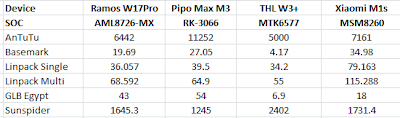


Somehow my tablet scores lower on the graphic related benchmarks than other devices with RK3066 reported online but still managed to end up the fastest among all the SOCs I have tested before in the graphics department.


Wireless reception is actually pretty good but as always nothing remarkable. Although it connects fine to a far away access points, it will intermittently disconnect so I cannot rate it as excellent but it is in no way disappointing either.
Other than the audio aspects of the tablet, this is actually quite a good product from Pipo but ultimately I cannot recommend this device. If you are willing to live by the horrible sounds then by all means, you can consider buying this tablet. Personally, I liked the tablet enough (good screen, good battery life, good build quality) that I want to keep it and just buy some bluetooth speakers and bluetooth audio receiver to connect to my headphones but I can't help but think that there must be other Chinese tablet which is better than this. I have tested tablets from SmartQ, Ramos, Cube, Pipo, Ainol and Onda and the only ones that stand out as having good potential are Onda and Pipo. I look forward to test tablets from other manufacturers especially Teclast, Ployer and Hyundai.


